
Secrets
A secret is any value you wouldn't commit to your repo - a Stripe key, a database URL, a signed token. You set it once, the platform stores it encrypted, and every preview deploy mounts it into your app as an environment variable. Your code just reads process.env.STRIPE_API_KEY and gets the value.
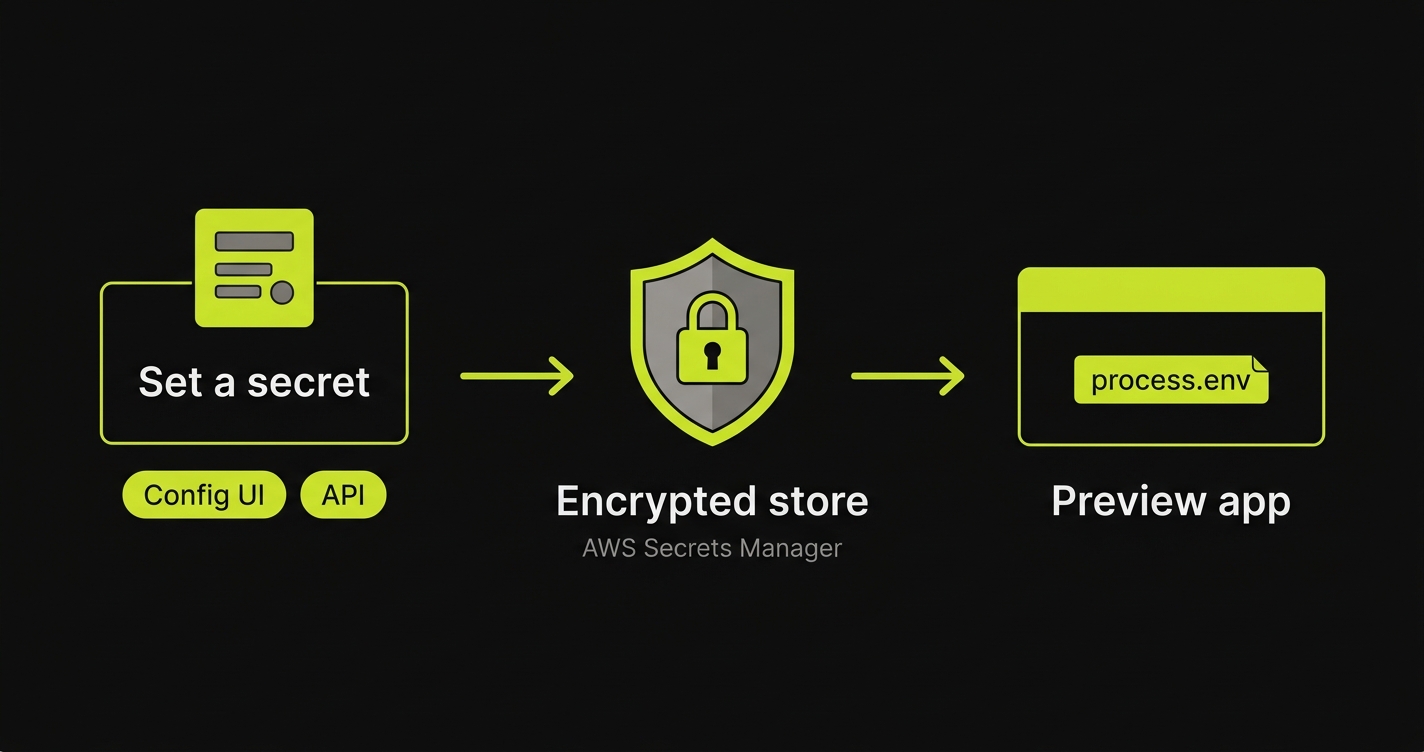
Two ways to set a secret
- In the config UI (most common). The Variables step of preview setup lets you add each key and value inline. This is the right place for a one-off, or when you’re setting things up by hand for the first time.
- From the API (for CI / automation). Script it when you have many keys, or rotate them from a pipeline. See Managing secrets from the API below.
Both routes write to the same encrypted store, so a value set in the UI is visible to the API and vice versa. The value lives in AWS Secrets Manager - never in your config, never in your repo - and is only ever readable by your own organization. Updates take effect on the next preview deploy for that app.
Secret, connection, or config value?
Not everything your app reads from process.env is a secret. Picking the right home is the thing people get wrong most often, so start here:
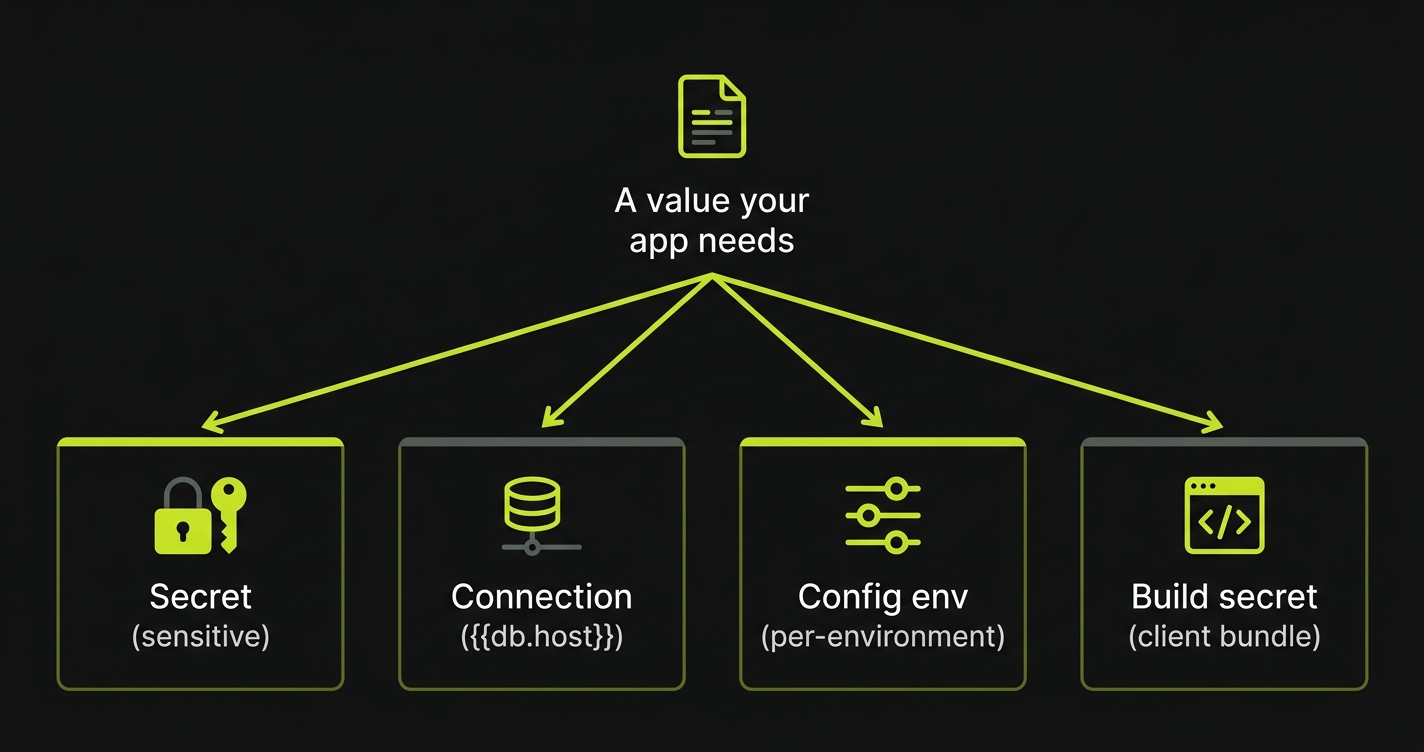
| Value | Where it goes | Why |
|---|---|---|
| Sensitive - API keys, database URLs, signed tokens | Secret (UI Variables step or API) | Stored encrypted, never in the repo or config. |
The address of another app/service in the same preview ({{db.host}}, {{api.url}}) | Connection - a templated value in the Variables step | The platform resolves the real in-cluster address at deploy time. Nothing to upload. |
Non-sensitive value that varies per environment (PLAID_ENV=sandbox) | Config env | Pinned alongside the rest of the config. Nothing to upload. |
A value baked into a client bundle at build time (NEXT_PUBLIC_*, VITE_*) | Secret + build_secrets | Must be present during the build, not just at runtime. See Build-time secrets. |
PR / owner / namespace metadata ({{pr}}, AUTONOMA_PREVIEWKIT_PR) | Injected automatically | Reserved built-ins. See Built-in environment variables. |
When in doubt, if the value is sensitive, make it a Secret. You only need build_secrets when a value must exist during the build (the client-bundle case).
Managing secrets from the API
Automate secrets from CI with four endpoints:
GET /v1/previewkit/secrets/:applicationId/:app # list keys (no values)PUT /v1/previewkit/secrets/:applicationId/:app # batch upsert; body: {"items":[{"key","value"},...]}PUT /v1/previewkit/secrets/:applicationId/:app/:key # single upsert; body: {"value":"..."}DELETE /v1/previewkit/secrets/:applicationId/:app/:key # delete one keyapplicationId is your autonoma Application row id. Look it up once via the dashboard and hardcode it in your CI. app matches an app’s name in your stack configuration. For a single-app repo it’s just that one name; for a monorepo each app has its own bundle.
Authentication
Every call needs an Authorization: Bearer <api-key> header. Create an API key from the autonoma dashboard (Settings → API keys); keys are scoped to your organization, so they can only see and modify your own applications’ secrets. Treat them like a password.
export AUTONOMA_API_KEY="ak_live_..."
# Batch upsertcurl -X PUT "https://api.autonoma.app/v1/previewkit/secrets/app_abc123/web" \  -H "Authorization: Bearer $AUTONOMA_API_KEY" \  -H "Content-Type: application/json" \  -d '{"items":[{"key":"STRIPE_API_KEY","value":"sk_live_..."},{"key":"SENTRY_DSN","value":"https://..."}]}'
# Single key upsertcurl -X PUT "https://api.autonoma.app/v1/previewkit/secrets/app_abc123/web/STRIPE_API_KEY" \  -H "Authorization: Bearer $AUTONOMA_API_KEY" \  -H "Content-Type: application/json" \  -d '{"value":"sk_live_..."}'
# List keys (names only, never values)curl "https://api.autonoma.app/v1/previewkit/secrets/app_abc123/web" \  -H "Authorization: Bearer $AUTONOMA_API_KEY"
# Deletecurl -X DELETE "https://api.autonoma.app/v1/previewkit/secrets/app_abc123/web/STRIPE_API_KEY" \  -H "Authorization: Bearer $AUTONOMA_API_KEY"
Calls without a valid Bearer token get a 401. Calls referencing an applicationId your key doesn’t have access to are indistinguishable from “no secrets yet” - the API never reveals whether a foreign application exists.
Build-time secrets (build_secrets)
NEXT_PUBLIC_* values for Next.js, VITE_* values for Vite, anything else baked into a client bundle at compile time - these need to be present during next build / vite build, not just at runtime. List them in an app’s build_secrets and Previewkit will pass them to your builder:
apps: - name: web port: 3000 build_secrets: - NEXT_PUBLIC_FIREBASE_API_KEY - NEXT_PUBLIC_FIREBASE_PROJECT_ID - NEXT_PUBLIC_STRIPE_PUBLISHABLE_KEYEach name must already be a key you’ve uploaded (via the UI or the API). The build fails fast with a clear error if a listed key isn’t there.
Server-only secrets (those your running pod reads via process.env) do NOT need to be in build_secrets - the runtime mount already covers them. Listing them anyway is harmless but verbose.
Config-level overrides
If you also define a key in an app’s env map in your stack configuration, the value there wins over the uploaded one. Use this for behaviour switches you want pinned alongside the rest of the config:
apps: - name: api port: 4000 env: # Pin a preview to safe defaults so it can't talk to live services. PLAID_ENV: "sandbox" SEND_EMAILS_LOCALLY: "false"Template substitutions ({{api.host}}, {{pr}}, etc.) inside env resolve the same way.
Built-in environment variables
Previewkit injects a few variables into every preview app automatically. You don’t upload them, and you can’t override them - the names are reserved, so the API rejects any secret you try to set with one of these keys.
| Variable | Value | Notes |
|---|---|---|
AUTONOMA_PREVIEWKIT | true | Always set inside a preview. Use it to detect the environment. |
AUTONOMA_PREVIEWKIT_PR | 123 | The pull request number this preview was built from. |
AUTONOMA_PREVIEWKIT_URL | https://<code>.preview.autonoma.app | The public HTTPS URL of this app in the preview. In a multi-app preview, each app gets its own URL. |
A common use is tagging your error reporter so preview errors are grouped per PR:
import * as Sentry from "@sentry/node";
Sentry.init({  dsn: process.env.SENTRY_DSN,  // "pr-123" in a preview, "production" everywhere else.  environment: process.env.AUTONOMA_PREVIEWKIT_PR != null    ? `pr-${process.env.AUTONOMA_PREVIEWKIT_PR}`    : "production",});