
Test Planner
The planner is the command Autonoma hands you, and it does the whole setup: a preview environment, a complete end-to-end test suite read from your codebase, the SDK integration that creates your test data, and a dry run proving it works. One invocation, start to finish, on managed Autonoma credits - no LLM API key required.
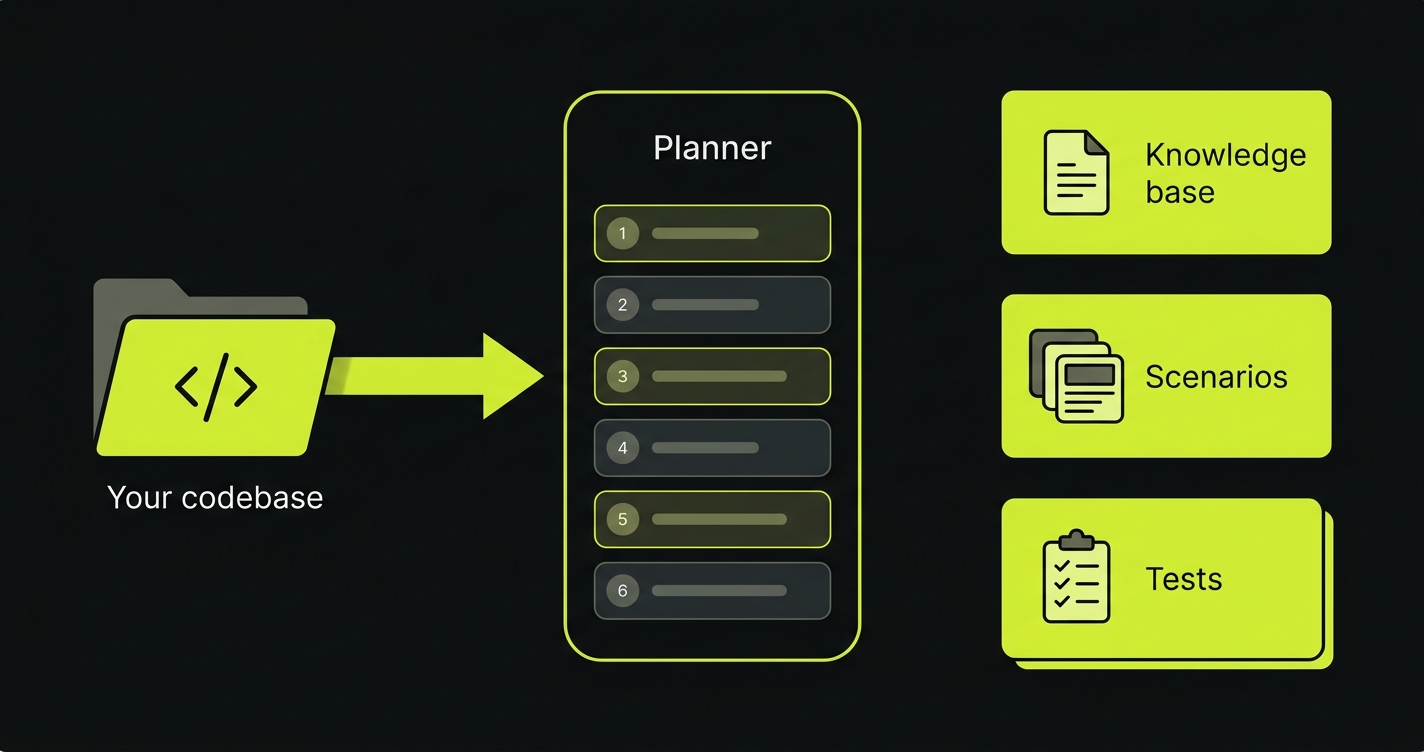
Run it
Autonoma shows you this command when you connect your app, with your token and ids already baked in. It has this shape:
AUTONOMA_SHARED_SECRET=<shared-secret> AUTONOMA_DISTINCT_ID=<distinct-id> AUTONOMA_API_TOKEN=<api-token> AUTONOMA_GENERATION_ID=<generation-id> AUTONOMA_APPLICATION_ID=<application-id> npx @autonoma-ai/planner@latestCopy it, open a terminal in your project, and paste. That is the whole of setup. There is no second command, no step list to work through, and nothing to install - npx fetches the planner and runs it.
What it needs from Autonoma
The command carries its own configuration as environment variables, so the only one you ever set by hand is a token for a standalone run.
| Variable | Required | What it does |
|---|---|---|
AUTONOMA_API_TOKEN | yes | The run’s credential. Create one under Settings → API keys |
AUTONOMA_APPLICATION_ID | no | The app this run belongs to. With it, the run also sets up the preview environment and validates the result; without it the planner runs standalone against any repository |
AUTONOMA_GENERATION_ID | for upload | The setup its generated artifacts are uploaded against |
AUTONOMA_SHARED_SECRET | no | Signs the SDK and webhook requests the run makes on your behalf |
AUTONOMA_API_URL | no | Point at a non-production Autonoma. Defaults to production |
AUTONOMA_DEBUG | no | Set to 1 or true for diagnostics on stderr, plus a full JSONL transcript of the run at ~/.autonoma/debug/<run-id>.jsonl |
AUTONOMA_DEBUG_FILE | no | Write that transcript to this path instead, without the stderr noise. Independent of DONT_TRACK - it never leaves your machine |
DONT_TRACK | no | Set to 1 or true to turn off analytics, logs and session replay together |
Where a run starts
The planner reads your app’s setup status when it launches and begins at the first thing still outstanding, so re-running it never redoes finished work:
- No preview environment yet - it starts there, then continues into the pipeline.
- A preview you already set up (by hand, or on a previous run) - straight to the pipeline.
- Everything but the scenario dry run - straight to the dry run.
- No
AUTONOMA_APPLICATION_ID- the planner runs standalone against the repository and uploads nothing.
If it is interrupted, --resume picks up from the step that did not finish.
While it runs
The run holds your app’s setup for as long as it is going, so Autonoma stops offering you the steps it is doing and points you back at your terminal. Take over in the web app hands those steps back to you - your run keeps going either way, so stop it in the terminal too if you meant to take the work back.
The same command also appears on the Upload test artifacts step of onboarding, for an app whose preview you set up by hand. It is the same command and the same run; it simply has less left to do.
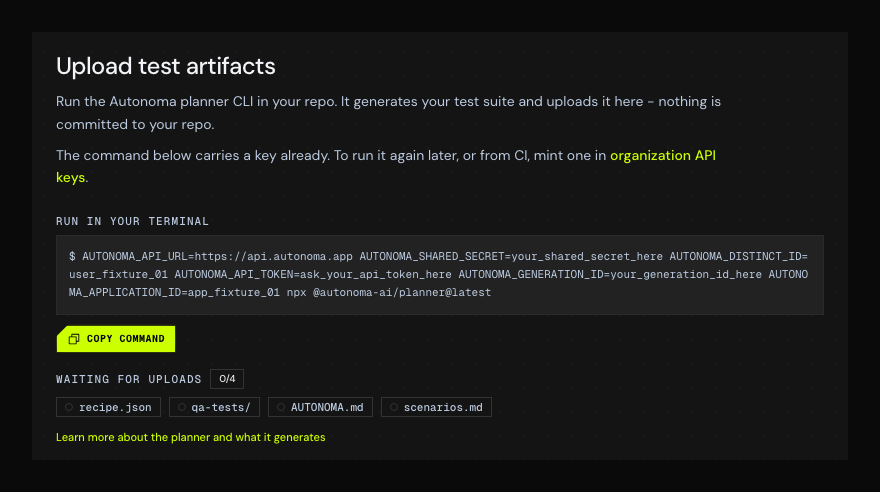
The four chips are how you watch the upload land: the count climbs and each one fills in as the planner sends it. Hover a chip to see what that file is.
That npx line downloads and runs the planner, published on npm as @autonoma-ai/planner. npx runs it without installing it, so there is no autonoma-planner command on your PATH afterwards - keep using the full npx form for every command below. Run it from the root of the repo you want to test. It works against your frontend (to map pages and flows) and your backend (to map data models and wire up test data). If those live in separate repos, run it where it can reach both.
Everything it produces is readable live in the dashboard as it’s written.
Watch it work
A full run can take an hour or more, so the pipeline phase runs inside a live dashboard right in your terminal.
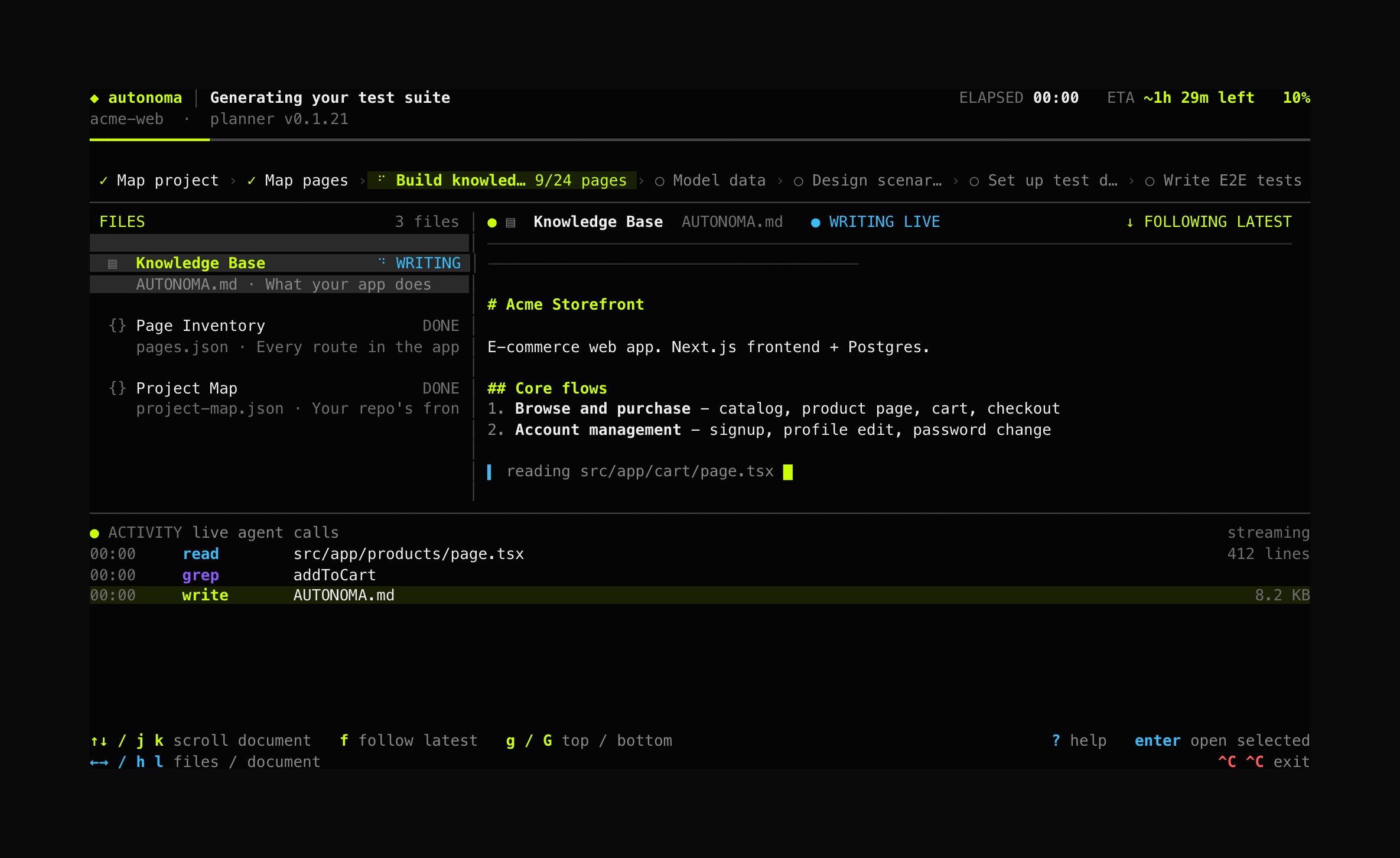
The pipeline runs as a strip across the top, so you can see every step and which one is live. Underneath, the files it has produced sit on the left and the document being written right now fills the pane on the right - streaming live from disk, so you can read the knowledge base, scenarios and tests as they are produced. The activity feed shows exactly what the agent is doing at any moment, and the top bar tracks elapsed time and a single estimated time remaining.
Navigate with the arrow keys (or h/j/k/l): move between panels, open any produced file, and scroll it while the run continues. Press f to jump back to following the newest file. Progress is saved continuously - Ctrl+C twice exits, and --resume picks up where you left off.
The dashboard needs a terminal window of at least 80x24. In anything smaller it shows a short resize notice rather than a layout it cannot fit, and returns by itself the moment the window is big enough. The run continues regardless - only the display waits.
What it does
| # | Step | What it does | Output |
|---|---|---|---|
| 1 | Preview environment | Hands your own coding agent the job of setting up a real per-pull-request deployment for Autonoma to test against. Skipped when you already have one. | a live preview |
| 2 | Map your project structure | Finds your frontend(s) and backend(s) so later steps scan only what matters. | project-map.json |
| 3 | Find your pages | Maps every page and route in your app. | pages.json |
| 4 | Build a knowledge base | Learns your features, flows, and UI patterns. | AUTONOMA.md |
| 5 | Map your data models | Finds what your app stores and how each record is created. | entity-audit.md |
| 6 | Design test scenarios | Decides the realistic data each test runs against. | scenarios.md |
| 7 | Set up test data | Hands the Environment Factory integration to your own coding agent, which implements it, validates it live, and produces the recipe. | recipe.json |
| 8 | Generate the tests | Writes the E2E tests as natural-language markdown, covering every page and feature, then uploads the suite. | qa-tests/ |
Step 1: your coding agent sets up the preview environment
Autonoma tests against a preview environment - a real deployment of your app, built per pull request. Working out how your app should get one means reading your build, your services and your environment, which your coding agent can do far faster than you can describe it.
So the planner hands that job over. It registers Autonoma’s MCP server with your agent and then starts a fresh session on the task. Registering first is the whole trick: an agent loads its MCP servers at startup, so it can never pick up one it registered itself - which is why this has to come from a command rather than from inside a session you already have open.
What the agent does next depends on which path your app takes - Autonoma-hosted previews, Vercel, or your own pipeline. All three are covered in set up a preview with a coding agent, along with the tools it uses and what you see in the Autonoma UI while it works.
The planner reads whether the preview is up from Autonoma rather than from the agent’s exit code - an interactive session does not exit when its work is done, and its exit status says nothing about whether a deployment landed. That is also what makes this identical across all three paths. If the preview never comes up, the run carries on generating your test suite and tells you: only the scenario dry run needs a live preview.
Step 7: your coding agent wires the test data
Setting up test data means wiring the Environment Factory into your backend - real code in your repo. Instead of handing you instructions to paste somewhere, the planner launches your locally installed coding agent (Claude Code or Codex CLI) in one session, the same way git commit opens your editor: the dashboard steps aside, your agent takes the terminal, and control returns when it’s done.
The agent installs the SDK, builds the endpoint, registers factories that call your app’s real creation code, generates the test-data recipe, and validates every entity against your locally running app - creating records, checking your database, tearing them down, and checking they’re gone. It works on its own branch, cut from your repo’s default branch, and pushes the finished integration as a pull request for you to review - so nothing lands on your default branch unreviewed. When it reports the integration complete, the planner uploads the recipe and moves on to test generation.
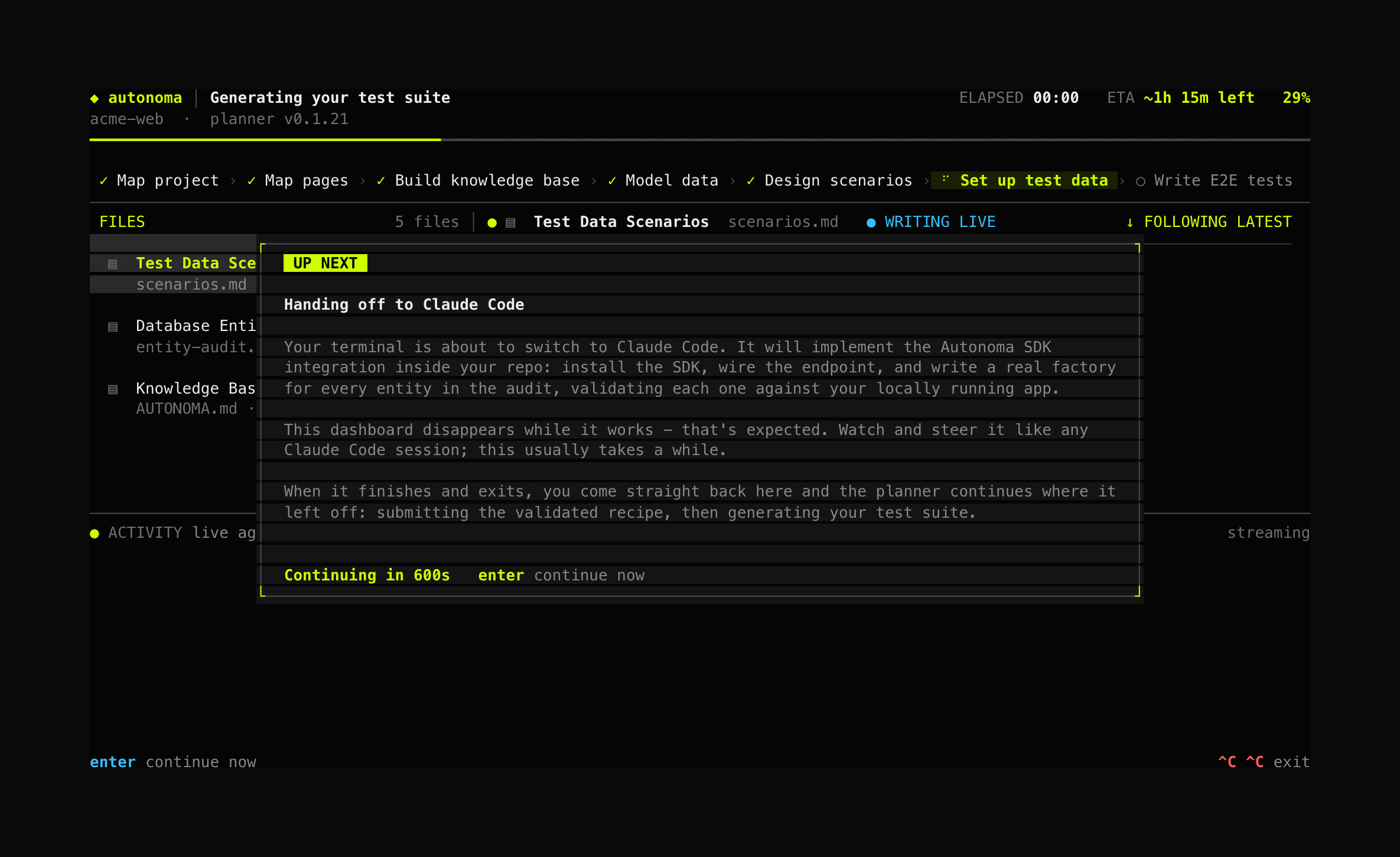
The dashboard warns you before it steps aside, and you can skip the countdown with enter.
By default the session is fully autonomous; pass --permission-mode to make it ask before edits or commands instead. If no supported agent is installed (or you decline), the planner writes the full instructions to ~/.autonoma/<project-slug>/integration-prompt.md so you can implement them with any assistant, then continue with --resume.
Reviewing the output
Everything the planner produces streams into the dashboard’s file list the moment it’s written - open any file and read it while the run continues. If a step fails, the planner stops and asks whether to retry, retry with a steering note, or stop; progress is saved either way.
Commands and flags
You run the planner through npx, which does not install anything on your PATH. Every command
below therefore keeps the full npx @autonoma-ai/planner@latest prefix - a bare autonoma-planner
will give you command not found unless you installed it globally yourself.
The subcommand comes first, before any flags.
# Run the pipeline. This is the command the dashboard gives you, with your tokens filled in.AUTONOMA_SHARED_SECRET=<shared-secret> AUTONOMA_DISTINCT_ID=<distinct-id> AUTONOMA_API_TOKEN=<api-token> AUTONOMA_GENERATION_ID=<generation-id> \  npx @autonoma-ai/planner@latest
# Show how far the last run got. Local only - reads the saved progress file, no network.npx @autonoma-ai/planner@latest status
# Re-send everything already generated on disk. Idempotent, and the fix when a run# finished but an artifact did not arrive. Needs the same env vars as the run.AUTONOMA_API_TOKEN=<api-token> AUTONOMA_GENERATION_ID=<generation-id> \ npx @autonoma-ai/planner@latest uploadFlags go after the subcommand. --help prints all of this, plus what each step does:
--project <path> # target a repo other than the current directory--frontend <path> # in a monorepo, the frontend directory to plan tests for--backend <path> # a backend/data layer it talks to. Repeatable, or comma-separated--non-interactive # run unattended - see below--coding-agent <name> # which agent handles the preview and SDK steps: claude | codex--permission-mode <mode> # its autonomy: bypassPermissions (default) | acceptEdits | default--resume # continue from where a previous run stopped--fresh # discard a previous run's output and start over--step <name> # run a single step and stop - for debugging one step, not for sequencing a run--model <id> # pick a different Autonoma-hosted model (still no key needed)--slug <name> # override the output folder name under ~/.autonoma/--help # every action this can take--agent and --backends are accepted as aliases of --coding-agent and --backend.
Running unattended
Hand the same command to a hosted agent, an autonomous engineer, or a CI job and add --non-interactive. It runs the entire pipeline in one invocation - there is no step list to sequence, and nothing to call back into:
AUTONOMA_API_TOKEN=<api-token> AUTONOMA_GENERATION_ID=<generation-id> AUTONOMA_APPLICATION_ID=<application-id> \ npx @autonoma-ai/planner@latest --non-interactive \ --coding-agent claude --frontend apps/web --backend apps/apiWith nobody to answer a question, everything that would have been asked has to arrive as a flag. What the run does about that:
- It never opens a browser. The coding agent’s Autonoma connection is authorized with the
AUTONOMA_API_TOKENthe run already holds, sent as a bearer header. There is no sign-in step to complete. - It never blocks on a question. Where it has to assume an answer it says so on stdout, naming what was asked and what it took.
- It reports each step as it starts and finishes, with how long it took, so the process that launched it can follow along.
- It refuses rather than guesses when a wrong guess would spend the run on the wrong thing - several frontends and no
--frontendplans a test suite for an app you did not mean, so it fails with a clear error instead. - It chooses, and says so, where the choice is cheap. Two coding agents installed and no
--coding-agentpicks the first and names it in a warning. Refusing there would skip the preview environment entirely and leave every later step planning against an app with nowhere to deploy - far worse than running the other agent. Pass--coding-agentto decide it yourself.
The coding agent it starts runs headless too (claude -p, codex exec), fully autonomous by default. Claude Code is started on Opus, for its own session and for any subagent it spawns - these steps install the SDK and validate it against a live app, and a weaker model there fails in ways that read as your app being broken.
Output
Artifacts are written to ~/.autonoma/<project-slug>/ as they’re produced. When you run the planner from the onboarding flow’s upload step, the knowledge base, scenarios, recipe, and generated tests are uploaded to Autonoma automatically at the end - ready to run against your preview environments.