

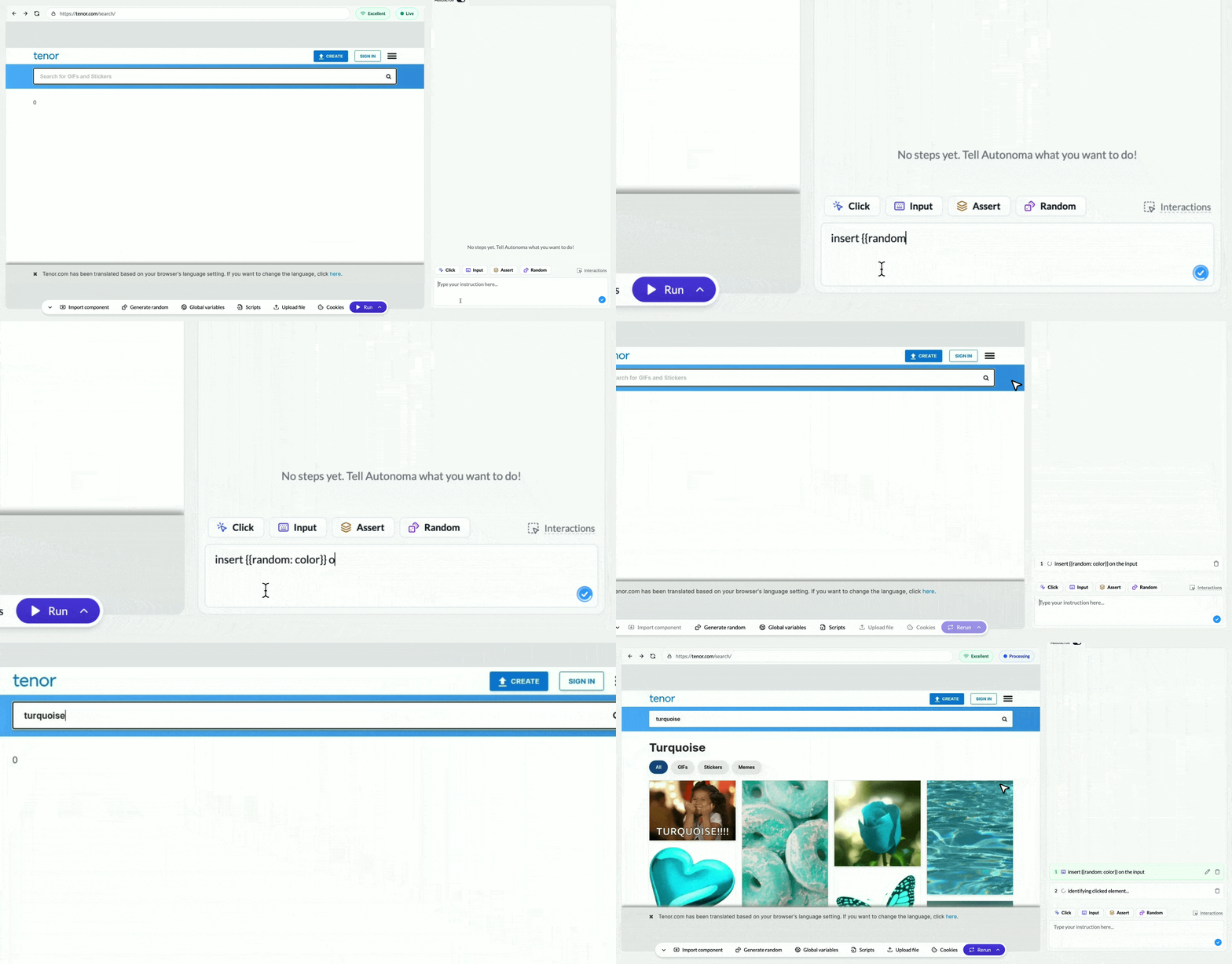
Using Autonoma's Creationg Showing Random Functionliaty

The Test That Works Once

You build a beautiful registration test:
Test: "User registration"

1. Navigate to {{variable:APP_URL}}/signup
2. Type [email protected] in email field
3. Type Password123! in password field
4. Click "Sign Up"
5. Wait until: Welcome message appears
You run it. It works perfectly. Green checkmark. Success. You run it again the next day. Red X. Failed. The error message: “Email already exists. Please use a different email.” Wait—what? You didn’t change anything. Why does the test work once and then break forever? The problem: Your first test run created a user with [email protected]. Your database now has that email. The second run tries to create the same user again, and your app correctly rejects it as a duplicate. The solution you don’t want: Manually delete the test user after each run, or use a different email each time. Both are tedious and unsustainable. The solution you need: Random data that generates a unique email every single run.

What Is Random Data?

Random data is Autonoma’s ability to generate unique values automatically for each test run. Instead of hardcoding [email protected], you use {{random:email}}. Autonoma generates a fresh email every time: Each run gets a unique email. No conflicts. No “user already exists” errors. Your test works forever.

Your First Random Data Test

Let’s fix that broken registration test. Before (breaks after first run):
Test: "User registration"

1. Navigate to {{variable:APP_URL}}/signup
2. Type [email protected] in email field ← Problem!
3. Type Password123! in password field
4. Click "Sign Up"
5. Wait until: Welcome message appears
After (works every run):
Test: "User registration"

1. Navigate to {{variable:APP_URL}}/signup
2. Type {{random:email}} in email field ← Unique each time!
3. Type {{random:password}} in password field
4. Click "Sign Up"
5. Wait until: Welcome message appears
Now every test run creates a genuinely new user. No cleanup needed. No conflicts. Just reliable tests.

Types of Random Data

Autonoma can generate random data for virtually any text concept. Here are the most common types: Email addresses:
{{random:email}}
[email protected]
Names:
{{random:first_name}} → Alice
{{random:last_name}} → Johnson
{{random:full_name}} → Bob Smith
Passwords:
{{random:password}}
→ Xk9#mP2$vL4@
Addresses:
{{random:address}} → 742 Evergreen Terrace
{{random:city}} → Springfield
{{random:state}} → California
{{random:zip_code}} → 94105
Phone numbers:
{{random:phone_number}}
→ +1-555-0127
Company names:
{{random:company_name}}
→ Acme Industries
Usernames:
{{random:username}}
→ cooluser_847
The magic: You can request random data for any concept. Want a random product name? {{random:product_name}}. Need a random book title? {{random:book_title}}. Autonoma’s AI understands the concept and generates appropriate data.

Real-World Example: Complete Registration Form

Let’s test a full registration form with multiple fields:
Test: "Complete user registration with all fields"

1. Navigate to {{variable:APP_URL}}/signup
2. Wait until: Registration form loads
3. Type {{random:first_name}} in "First Name" field
4. Type {{random:last_name}} in "Last Name" field
5. Type {{random:email}} in "Email" field
6. Type {{random:phone_number}} in "Phone" field
7. Type {{random:address}} in "Street Address" field
8. Type {{random:city}} in "City" field
9. Type {{random:state}} in "State" field
10. Type {{random:zip_code}} in "Zip Code" field
11. Type {{random:password}} in "Password" field
12. Type {{random:password}} in "Confirm Password" field ← Same password!
13. Click "Sign Up"
14. Wait until: Welcome message appears
Important detail: Notice step 11 and 12 both use {{random:password}}. Within a single test run, the same random placeholder generates the same value. This ensures the password and confirmation match.

When to Use Random Data

Use random data whenever you need values that: Must be unique:
  • Email addresses (can’t register twice)
  • Usernames (must be unique in system)
  • Account numbers (no duplicates allowed)
Can’t conflict with existing data:
  • Customer names in customer creation
  • Product SKUs in inventory tests
  • Order references
Need to test with varied data:
  • Form validations with different inputs
  • Search features with different queries
  • Filters with various values
Simulate real user behavior:
  • Different users creating accounts
  • Various addresses for shipping
  • Multiple phone number formats

Random Data vs Variables

Let’s clarify when to use each: Use variables when:
  • You want the same value in all test runs
  • You’re logging into an existing account
  • You’re testing with specific known data
Test: "Login to existing account"

Type {{variable:TEST_EMAIL}} ← Same account every time
Use random data when:
  • You want a different value each test run
  • You’re creating new accounts/data
  • You need unique values to avoid conflicts
Test: "Create new account"

Type {{random:email}} ← New account every time
Think of it this way:
  • Variables are like your personal email address—stable and reusable
  • Random data is like disposable email addresses—new one each time

Combining Random Data with Extraction

Here’s a powerful pattern: Use random data to create something, then extract the value to verify it later.
Test: "Create customer and verify in customer list"

1. Navigate to {{variable:APP_URL}}/admin/customers
2. Click "Add Customer"
3. Type {{random:first_name}} in "First Name" ← Random
4. Type {{random:last_name}} in "Last Name" ← Random
5. Add prompt: "Extract information about the full name with key CUSTOMER_NAME" ← Extract it
6. Type {{random:email}} in "Email"
7. Click "Save Customer"
8. Wait until: "Customer created" message appears
9. Navigate to customer list
10. Wait until: Customer {{key:CUSTOMER_NAME}} appears in list ← Verify the random name
This pattern lets you create unique data (avoiding conflicts) while still verifying it appears correctly elsewhere in your app.

Testing Multiple Scenarios with Random Data

Random data makes it easy to test forms with various inputs:
Test: "Register user - Scenario A"

1. Navigate to signup
2. Type {{random:email}}
3. Type {{random:password}}
4. Click "Sign Up"
5. Verify success
Test: "Register user - Scenario B"

1. Navigate to signup
2. Type {{random:email}}
3. Type {{random:password}}
4. Select {{random:country}} in country dropdown
5. Click "Sign Up"
6. Verify success
Test: "Register user - Scenario C"

1. Navigate to signup
2. Type {{random:email}}
3. Type {{random:password}}
4. Check "Subscribe to newsletter"
5. Click "Sign Up"
6. Verify success
Each test runs with completely different data, ensuring your form handles variety.

Random Data for Edge Case Testing

You can even request random data for edge cases:
{{random:very_long_email}} → thisissomeonewithanabnormallylongemailaddress@averylongdomainname.com
{{random:short_name}} → Li
{{random:special_characters_name}} → O'Brien-Smith
{{random:international_phone}} → +44-20-7946-0958
This helps test that your forms handle unusual but valid inputs.

The Cleanup Question

You might wonder: “If I’m creating new users every test run, won’t my database fill up with junk data?” Yes—and that’s usually fine for staging/test environments. Test databases are meant to accumulate test data. If cleanup is critical:
  1. Run tests against a test environment that resets periodically
  2. Use a cleanup script that runs nightly to delete test data
  3. Use Autonoma’s fetch actions to call an API endpoint that deletes test users after runs
Most teams don’t worry about this. Test databases are disposable. Production databases never see test data.

What’s Next

You now understand how random data solves the “works once, breaks forever” problem. Combined with variables (for stable values) and keys (for extracted values), you have complete control over test data. Next, let’s explore how to avoid writing the same test logic over and over by using components—tests that reference other tests.