
Secrets
A secret is any value you wouldn't commit to your repo - a Stripe key, a database URL, a signed token. You set it once, the platform stores it encrypted, and every preview deploy mounts it into your app as an environment variable. Your code just reads process.env.STRIPE_API_KEY and gets the value.
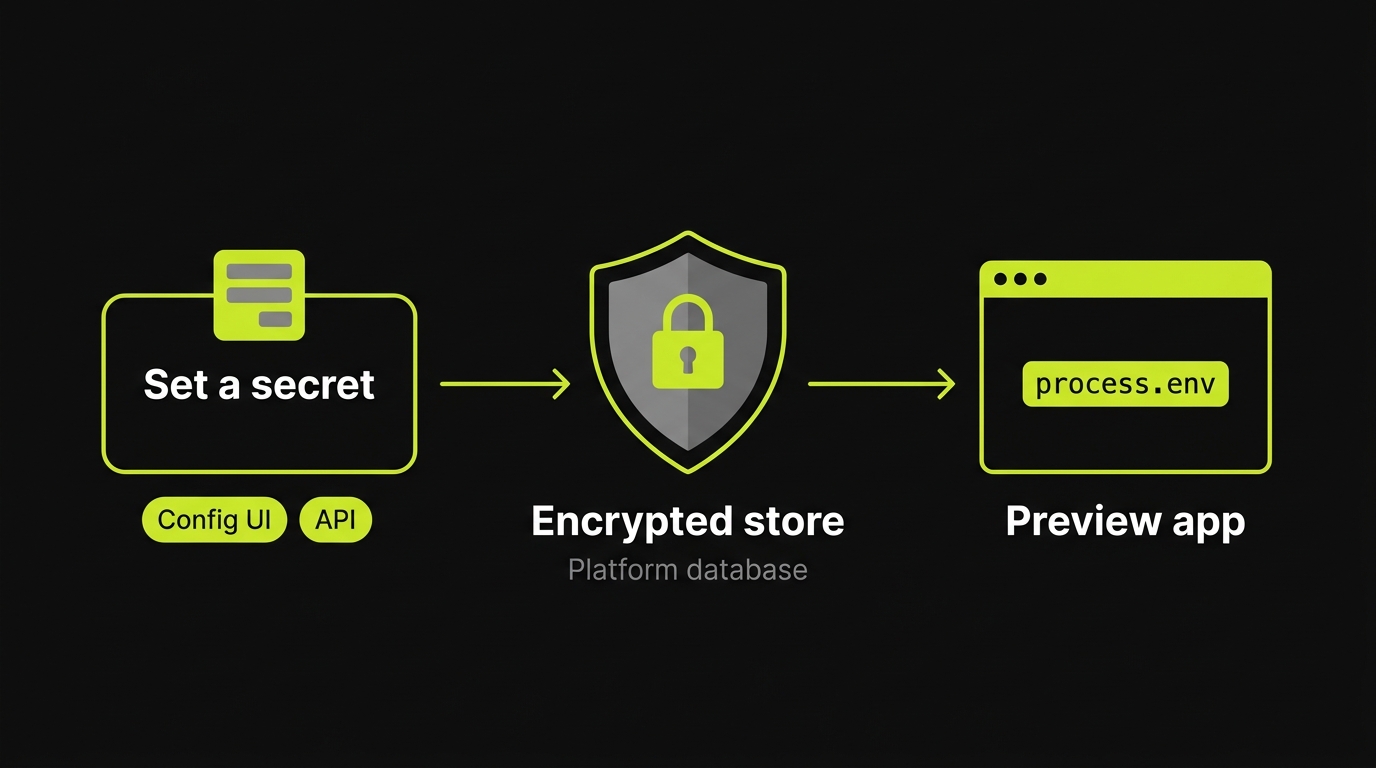
Two ways to set a secret
- In the config UI (most common). The Variables step of preview setup holds every variable for an app in one list, with an editor beside it. This is the right place for a one-off, or when you’re setting things up by hand for the first time.
- From the API (for CI / automation). Script it when you have many keys, or rotate them from a pipeline. See Managing secrets from the API below.
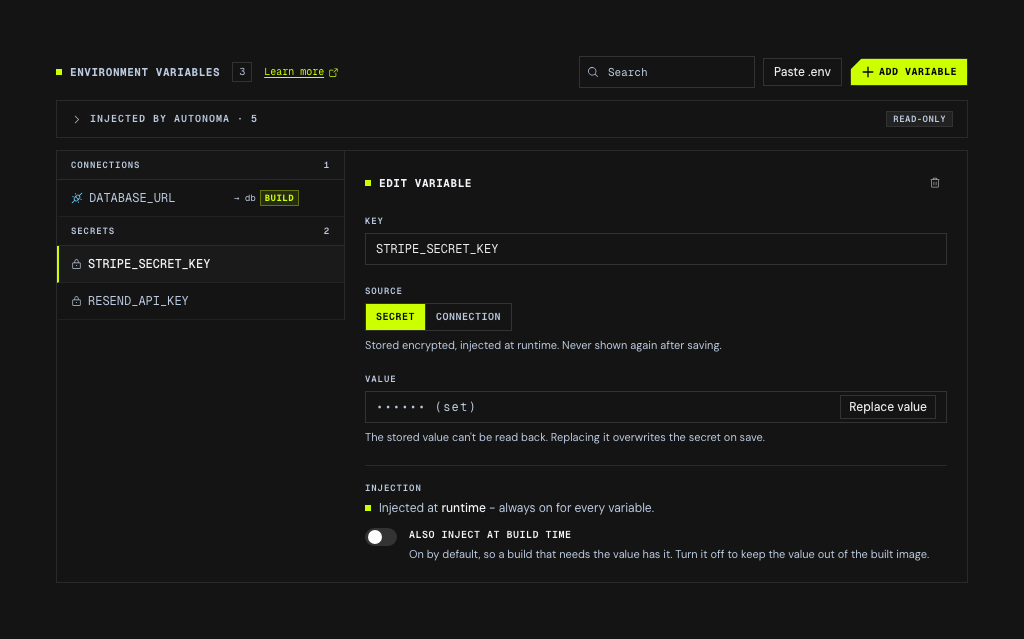
Two things in that panel are worth knowing before you start. A saved secret can only be replaced, never read back - the value field shows •••••• (set) and nothing else. And the Source control is where the secret-versus-connection decision below actually gets made, with the product writing the one-line rationale for each next to it.
Both routes write to the same encrypted store, so a value set in the UI is visible to the API and vice versa. The value lives encrypted in the platform’s database - never in your config, never in your repo - and is only ever readable by your own organization. Updates take effect on the next preview deploy for that app.
Because a secret lives outside the config, it also saves on its own. When the only thing you have changed is secrets, the save button reads Save secrets and writes just those - so a rotation goes through even when the rest of the config is mid-edit or has a problem of its own. The build-time toggle saves the same way: it is a property of the secret, not of the config.
Secret, connection, or config value?
Not everything your app reads from process.env is a secret. Picking the right home is the thing people get wrong most often, so start here:
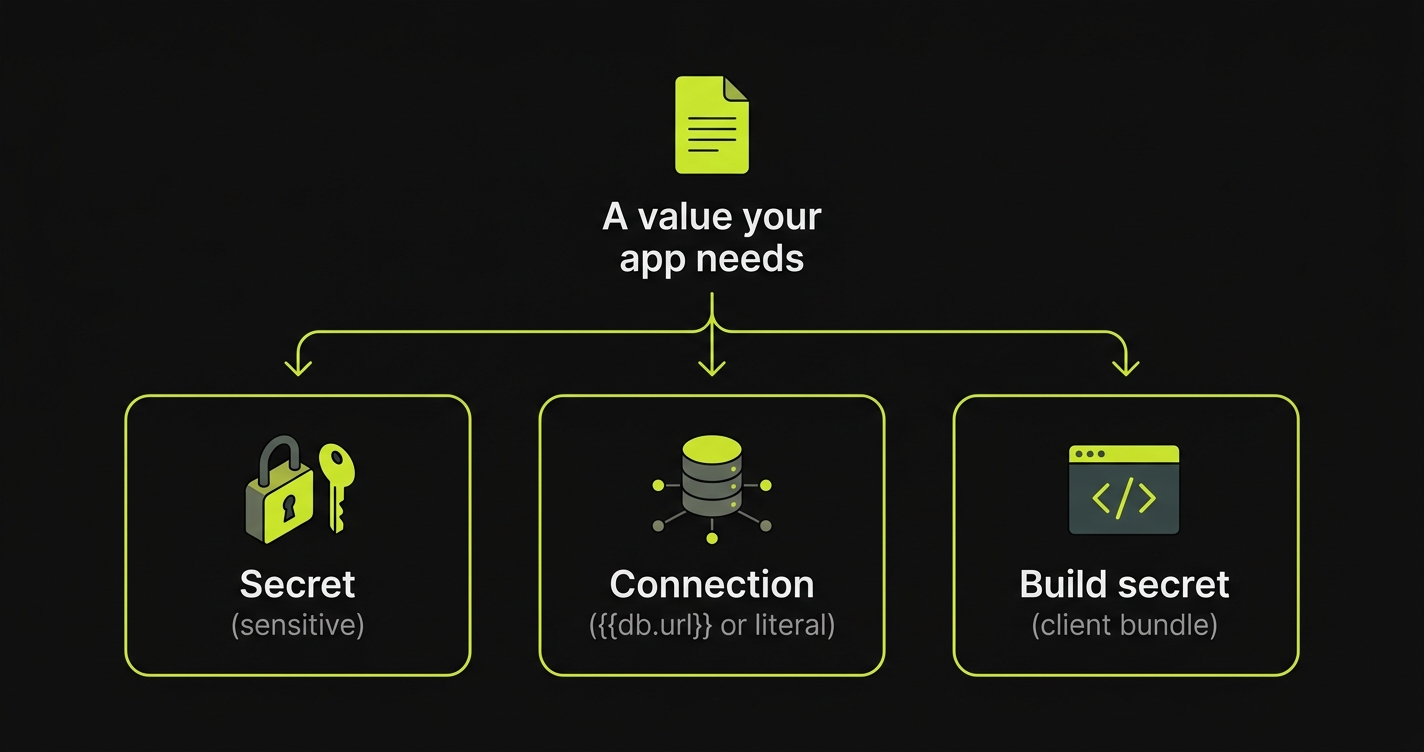
| Value | Where it goes | Why |
|---|---|---|
| Sensitive - API keys, database URLs, signed tokens | Secret (UI Variables step or API) | Stored encrypted, never in the repo or config. |
The address of another app/service in the same preview ({{db.host}}, {{api.url}}) | Connection - a templated value in the Variables step | The platform resolves the real in-cluster address at deploy time. Nothing to upload. |
Non-sensitive value that varies per environment (PLAID_ENV=sandbox) | Connection with a literal value | Pinned alongside the rest of the config. Nothing to upload. |
A value baked into a client bundle at build time (NEXT_PUBLIC_*, VITE_*) | Secret, marked build-time | Must be present during the build, not just at runtime. See Build-time secrets. |
PR / owner / namespace metadata ({{pr}}, AUTONOMA_PREVIEWKIT_PR) | Injected automatically | Reserved built-ins. See Built-in environment variables. |
When in doubt, if the value is sensitive, make it a Secret. A secret added in the UI is build-time by default, so the client-bundle case works without you thinking about it - see Build-time secrets for when to turn that off.
Managing secrets from the API
Automate secrets from CI with four endpoints:
GET /v1/previewkit/secrets/:applicationId/:app # list keys (no values)PUT /v1/previewkit/secrets/:applicationId/:app # batch upsert; body: {"items":[{"key","value"},...]}PUT /v1/previewkit/secrets/:applicationId/:app/:key # single upsert; body: {"value":"..."}DELETE /v1/previewkit/secrets/:applicationId/:app/:key # delete one keyapplicationId is your autonoma Application row id. Look it up once via the dashboard and hardcode it in your CI. app matches an app’s name in your stack configuration. For a single-app repo it’s just that one name; for a monorepo each app has its own bundle.
Authentication
Every call needs an Authorization: Bearer <api-key> header. Create an API key from the autonoma dashboard (Settings → API keys); keys are scoped to your organization, so they can only see and modify your own applications’ secrets. Treat them like a password.
export AUTONOMA_API_KEY="ak_live_..."
# Batch upsertcurl -X PUT "https://api.autonoma.app/v1/previewkit/secrets/app_abc123/web" \  -H "Authorization: Bearer $AUTONOMA_API_KEY" \  -H "Content-Type: application/json" \  -d '{"items":[{"key":"STRIPE_API_KEY","value":"sk_live_..."},{"key":"SENTRY_DSN","value":"https://..."}]}'
# Single key upsertcurl -X PUT "https://api.autonoma.app/v1/previewkit/secrets/app_abc123/web/STRIPE_API_KEY" \  -H "Authorization: Bearer $AUTONOMA_API_KEY" \  -H "Content-Type: application/json" \  -d '{"value":"sk_live_..."}'
# List keys (names only, never values)curl "https://api.autonoma.app/v1/previewkit/secrets/app_abc123/web" \  -H "Authorization: Bearer $AUTONOMA_API_KEY"
# Deletecurl -X DELETE "https://api.autonoma.app/v1/previewkit/secrets/app_abc123/web/STRIPE_API_KEY" \  -H "Authorization: Bearer $AUTONOMA_API_KEY"
Calls without a valid Bearer token get a 401. Calls referencing an applicationId your key doesn’t have access to are indistinguishable from “no secrets yet” - the API never reveals whether a foreign application exists.
Build-time secrets
NEXT_PUBLIC_* values for Next.js, VITE_* values for Vite, anything else baked into a client bundle at compile time - these need to be present during next build / vite build, not just at runtime.
Build-time-ness belongs to the secret itself, so you set it where you set the value - and a new secret is build-time by default, in the UI (Also inject at build time, on) and over the API alike. The client-bundle case therefore works without you thinking about it.
Turn it off for a value the image must not carry:
# MCPset_secret(repoFullName, prNumber, app, key, value, buildTime: false)Omitting buildTime on a key that already exists leaves its setting alone, so rotating a value never quietly changes when it is used.
A build-time value is written into the image, so anyone who can pull that image can read it. Preview images are private to your organization and thrown away with the preview, which is why the default leans towards builds that work - but a value you would not want sitting in an image belongs off the toggle.
Server-only secrets (those your running pod reads via process.env) do not need to be build-time - every secret is in the runtime mount regardless.
Because the flag lives on the value, a key cannot be marked build-time before it has one. Set the value and the flag together and the build has what it needs; leave the value unset and the build simply does not receive that variable.
Config-level overrides
If you also define a key as an app connection in your stack configuration, the connection’s value wins over the uploaded secret. Use this for behaviour switches you want pinned alongside the rest of the config:
apps: - name: api port: 4000 connections: # Pin a preview to safe defaults so it can't talk to live services. - key: PLAID_ENV value: "sandbox" - key: SEND_EMAILS_LOCALLY value: "false"Connection values are templates - {{api.host}}, {{pr}}, and friends resolve at deploy time. See the template reference.
Built-in environment variables
Autonoma injects a few variables into every preview app automatically. You don’t upload them, and you can’t override them - the names are reserved. The dashboard rejects them, but this REST API does not validate the key - setting one here returns success and is then silently overridden at deploy time, so do not rely on an error to catch a typo.
| Variable | Value | Notes |
|---|---|---|
AUTONOMA_PREVIEWKIT | true | Always set inside a preview. Use it to detect the environment. |
AUTONOMA_PREVIEWKIT_PR | 123 | The pull request number this preview was built from. |
AUTONOMA_PREVIEWKIT_URL | https://<code>.preview.autonoma.app | The public HTTPS URL of this app in the preview. In a multi-app preview, each app gets its own URL. |
A common use is tagging your error reporter so preview errors are grouped per PR:
import * as Sentry from "@sentry/node";
Sentry.init({  dsn: process.env.SENTRY_DSN,  // "pr-123" in a preview, "production" everywhere else.  environment: process.env.AUTONOMA_PREVIEWKIT_PR != null    ? `pr-${process.env.AUTONOMA_PREVIEWKIT_PR}`    : "production",});