
Use your own deploys
If your project already builds a preview for every pull request, Autonoma does not need to build another one. Point it at the previews you have: your pipeline makes one signed HTTP call when a preview goes live, and Autonoma runs its tests against that URL.
This is the alternative to Autonoma-hosted preview environments. You choose between them during onboarding - either by answering a short questionnaire or by letting a coding agent decide from your repo - and you can still switch while you are setting up.
On this path Autonoma builds nothing, provisions nothing, and holds no stack configuration for your app. There is no Dockerfile to point at and no database to declare. The entire integration is the one call described below.
Which path to pick
The question is not “do previews already exist” - it is where the test data lands.
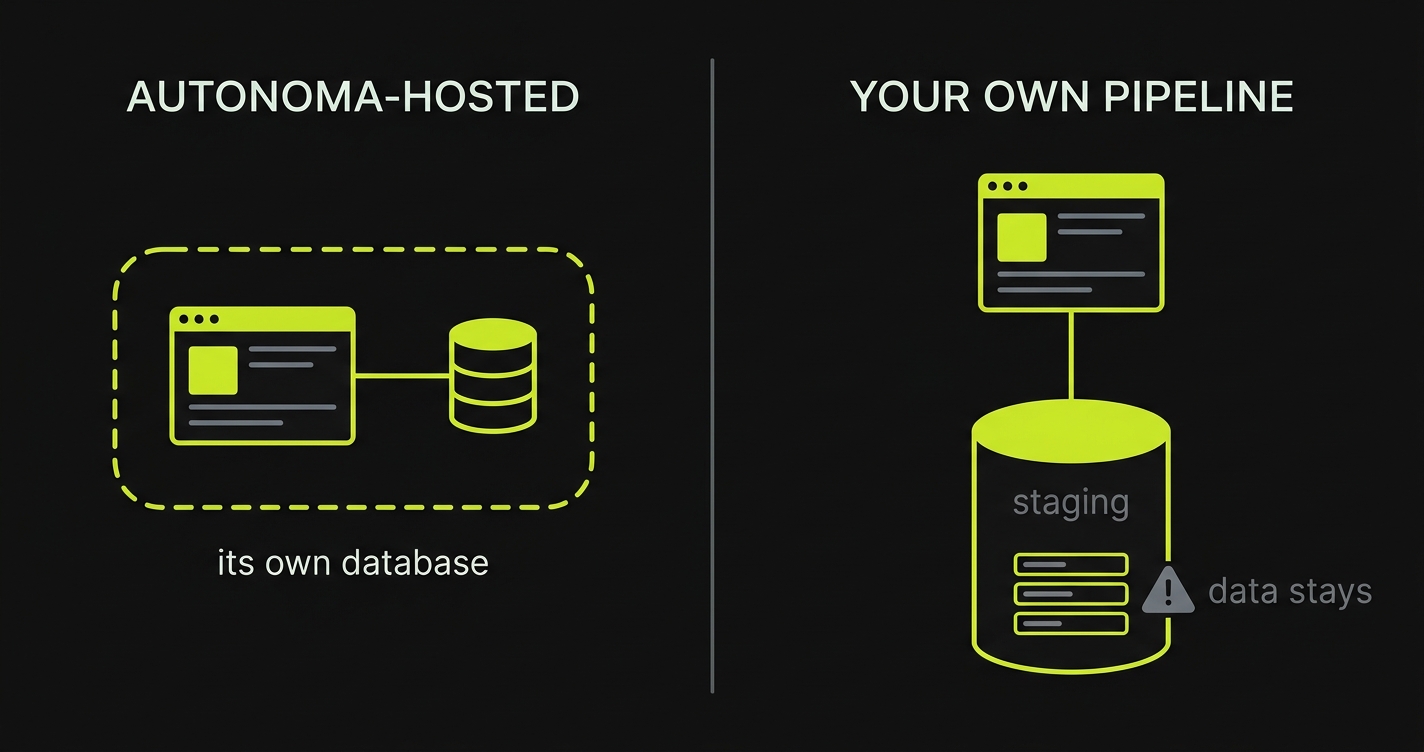
An Autonoma-hosted preview gets its own database, so a test run creates and destroys rows in an environment nothing else shares. Your own previews usually point at a real shared database - commonly staging, sometimes production. A test run writes into it, and anything it creates that no tenant owns stays there. Picture a marketplace whose previews share one database: a run creates listings, and real users see them.
| Your situation | Pick |
|---|---|
| No preview environments today | Autonoma-hosted - there is nothing to connect to |
| Previews today, and every row hangs off a tenant (an org, account, or workspace you can delete whole) | Either. Your own is less to change |
| Previews today, but the data is not cleanly tenant-scoped | Autonoma-hosted, despite the previews you already have |
| Not sure | Autonoma-hosted |
The two mistakes are not symmetrical. Choosing Autonoma-hosted when you did not need to costs a preview environment we build for you anyway. Choosing your own pipeline when your data is not tenant-scoped writes test data into your real database, in front of your users, and it cannot be taken back.
Autonoma-hosted is therefore the default, and it is the one a coding agent will pick on its own.
A coding agent will never choose this path for you. It is available on any host - Vercel or the signed webhook below - but it always takes your own decision, so the agent has to pass your answer back before Autonoma will accept it.
What differs is whether it raises the option. On Vercel our integration makes it a genuine choice, so the agent will ask. Anywhere else it will set up Autonoma-hosted previews and say nothing about this path; ask for it and it will explain both sides first. Either way you can pick it yourself in the Autonoma UI, which routes on the same questions.
The contract
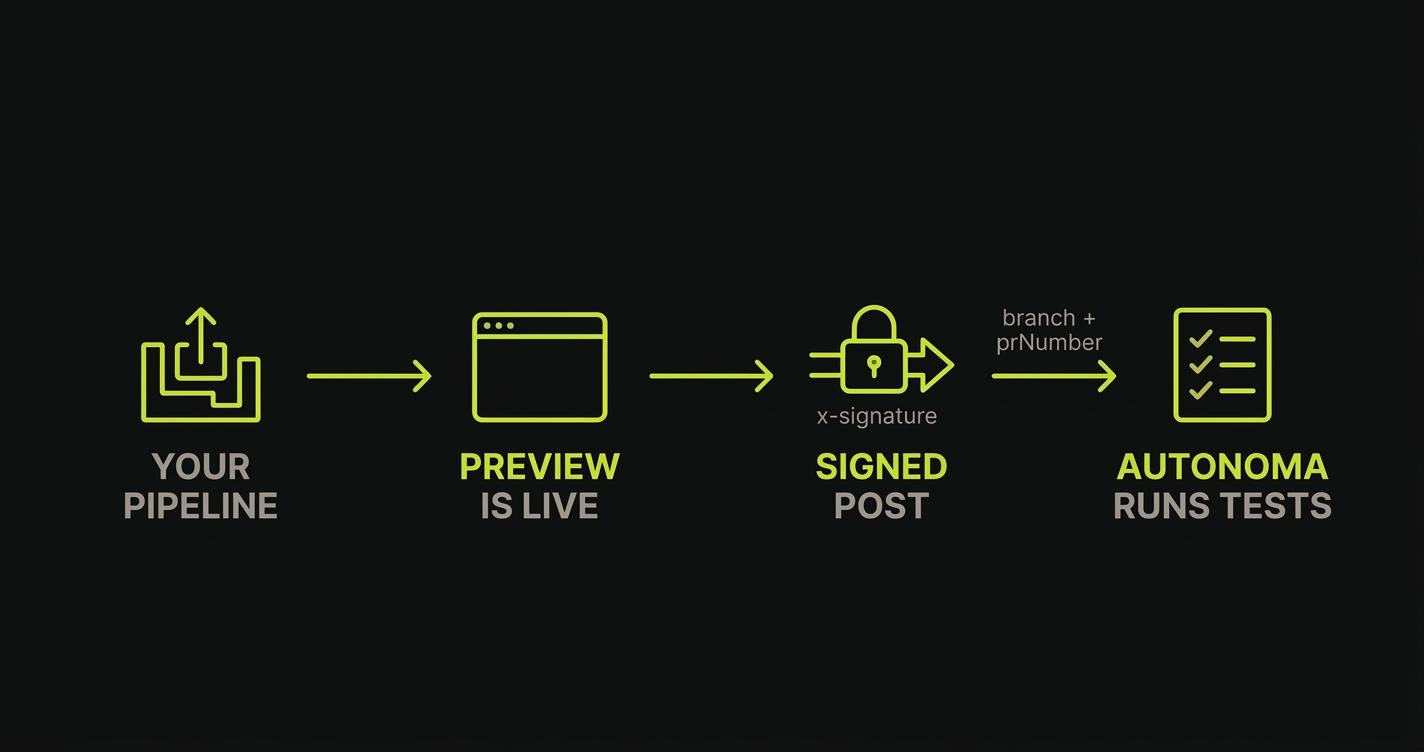
One POST, signed with a shared secret:
| Endpoint | https://api.autonoma.app/v1/onboarding/deployment-signal |
| Method | POST, content-type: application/json |
| Signature | x-signature: <hex> - HMAC-SHA256 of the exact raw body bytes, keyed with your shared secret |
| Secret | Shown on the Connect your deploys onboarding step; store it as AUTONOMA_SHARED_SECRET in your pipeline |
Sign the exact bytes you send. Serializing the JSON a second time after signing - a re-JSON.stringify, a formatter, a proxy that rewrites the body - changes the digest, and the call is rejected.
Body
| Field | Required | What it does |
|---|---|---|
applicationId | yes | The app this preview belongs to. Shown on the onboarding step |
previewUrl | yes | The URL Autonoma opens in a browser |
branch | pair | The deployed branch. Send with prNumber |
prNumber | pair | The pull request number. Send with branch |
sdkUrl | no | Only when your Environment Factory endpoint is on a different origin than previewUrl |
sha | no | The deployed commit |
provider | no | Free-text label for where the deploy came from |
branch and prNumber travel together, and this is the detail most worth getting right:
- Neither - the signal is recorded as a main-branch deploy. Fine for the standing preview of your default branch.
- Both - Autonoma reviews that pull request. This is what turns a signal into a per-PR review.
branchwithoutprNumber- the signal is dropped entirely. Never send one without the other.
Only signal the app Autonoma should browse
If one pull request deploys several things - a frontend, an API, a database - signal only the one Autonoma should open in a browser. Every signal overwrites the stored preview URL, so signalling all of them means whichever deploy finishes last wins, and that may well be your API rather than your frontend.
A starter workflow
The Connect your deploys step hands you a GitHub Actions workflow, and your coding agent can fetch the same one over MCP. Treat it as a template, not a requirement.
It hangs off GitHub’s deployment_status event, which is convenient when your host reports deployments back to GitHub - and which plenty of pipelines never emit. Autonoma requires only the signed call. If your project does not emit deployment_status, do not bend your pipeline to fit the sample: make the same call from whatever step already knows a preview is live - a deploy job, a post-deploy script, your host’s own webhook.
name: Autonoma preview signal
on:    deployment_status:
jobs:    notify:        if: github.event.deployment_status.state == 'success'        runs-on: ubuntu-latest        steps:            - name: Notify Autonoma              env:                  AUTONOMA_SHARED_SECRET: ${{ secrets.AUTONOMA_SHARED_SECRET }}                  AUTONOMA_ENDPOINT: https://api.autonoma.app/v1/onboarding/deployment-signal                  AUTONOMA_APPLICATION_ID: your-application-id                  PREVIEW_URL: ${{ github.event.deployment_status.target_url }}                  PREVIEW_SHA: ${{ github.event.deployment.sha || github.sha }}              run: |                  BODY=$(jq -nc \                    --arg applicationId "$AUTONOMA_APPLICATION_ID" \                    --arg previewUrl "$PREVIEW_URL" \                    --arg sha "$PREVIEW_SHA" \                    --arg provider "custom" \                    '{applicationId:$applicationId,previewUrl:$previewUrl,provider:$provider}                      + (if $sha == "" then {} else {sha:$sha} end)')                  SIG=$(printf '%s' "$BODY" | openssl dgst -sha256 -hmac "$AUTONOMA_SHARED_SECRET" -hex | sed 's/^.* //')                  curl -sS -X POST "$AUTONOMA_ENDPOINT" \                    -H "content-type: application/json" \                    -H "x-signature: $SIG" \                    --data "$BODY"
Copy it from the onboarding step rather than from here - that copy has your real applicationId filled in.
Note what this sample does not send: branch and prNumber. As written it records a preview URL but never asks for a pull-request review. Adding them is the main edit most projects make - on a pull-request deploy, look the PR up (gh api from the workflow, or whatever your pipeline already knows) and send both.
Put the secret in your pipeline’s secret store rather than committing it:
gh secret set AUTONOMA_SHARED_SECRETVerifying it works
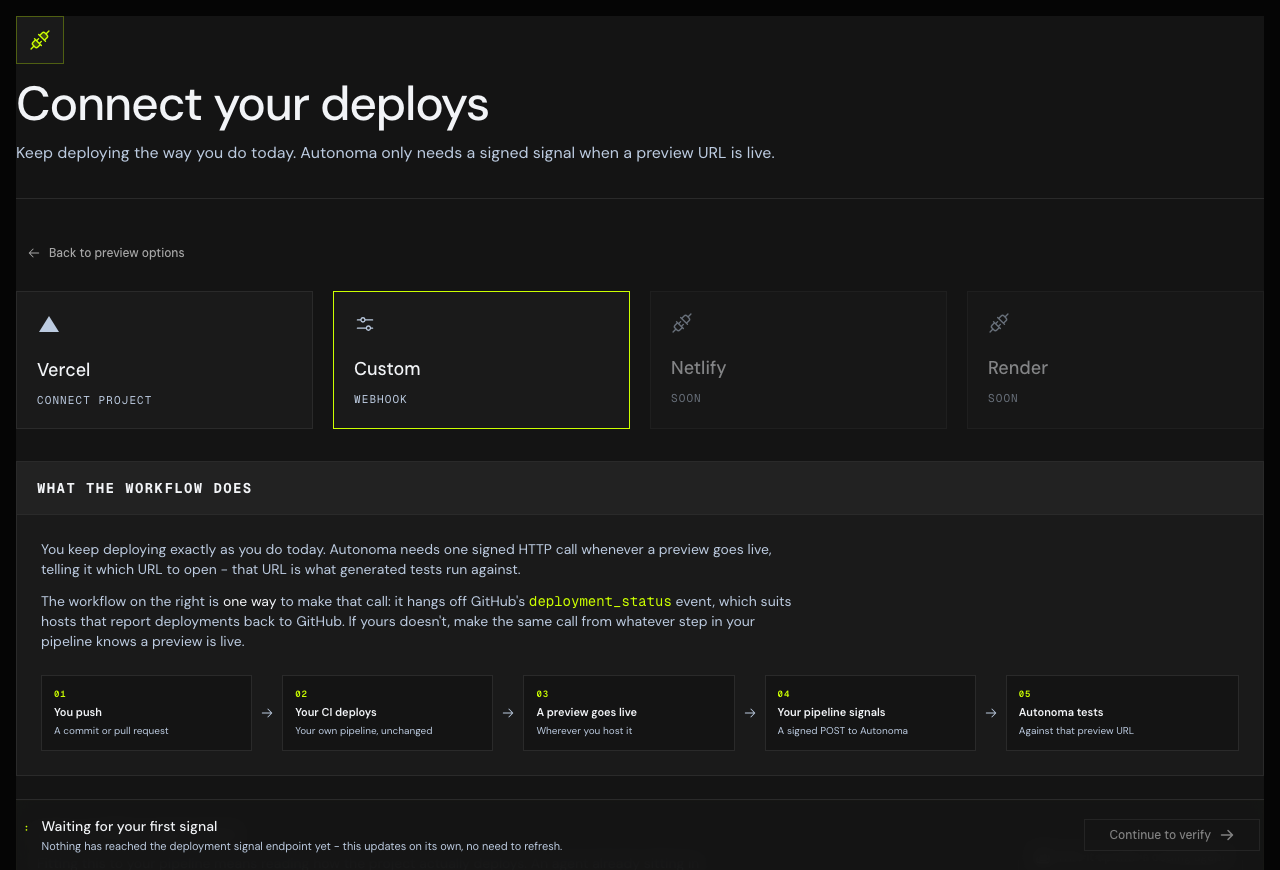
The onboarding step waits for your first real signal and unlocks Continue only once one arrives. That gate is deliberate: a signal is the only proof the wiring works.
Prove it with an actual run of your pipeline - push the branch and let it deploy. A hand-written curl proves your curl works, not that your pipeline calls us.
Watch for two separate milestones:
- A signal landed. The wiring is correct and Autonoma has a preview URL.
- A signal carried a
prNumber. Until this happens, your app records preview URLs but no pull request is ever reviewed - which is the thing you are actually here for. A main-branch signal alone is not a finished integration.
Do it with a coding agent
Your agent can do all of this - read how your pipeline actually deploys, write the call into the right step, open a pull request, and poll Autonoma until it sees a real signal land. Run the command Autonoma gives you during onboarding; it starts your agent on the job. See set up a preview with a coding agent.
See Set up a preview with a coding agent for the install and the tools it uses on this path: get_signal_setup, get_signal_status, confirm_signal_setup, and go_live to take the app live.
After the preview is connected
From here the two paths converge. Autonoma has a URL, and the rest of onboarding is identical:
- Environment Factory - the
/api/autonomaendpoint that creates and tears down each test’s data - Scenario recipes - the JSON your handler follows to build that data
Troubleshooting
Every call comes back rejected. The signature is over the raw bytes you POST. If you build the body, sign it, and then re-serialize it before sending, the digest no longer matches. Sign and send the same string.
Signals land but no pull request is reviewed. Your call is not sending prNumber. Check branch and prNumber go together on pull-request deploys.
A signal was accepted and then nothing happened. A signal carrying branch without prNumber is dropped by design. Send both or neither.
The preview URL points at the wrong service. More than one deploy in the pull request is signalling. Signal only the app Autonoma should browse.
Autonoma opens a stale URL. Every signal overwrites the stored URL, so the last one to arrive wins. If your pipeline signals from several jobs, keep the one that deploys the app under test.