
Fixing a degraded suite
When suite health drops to At risk or Degraded, the meter offers to hand the whole backlog to your coding agent in a single prompt. Most of the time one fix clears most of it.
A degraded suite looks like a lot of work. It usually is not. The same failure tends to land on every open pull request at once, so a backlog of two hundred findings is often one broken thing counted two hundred times.
Fix it
Hover the suite-health card on your application’s pull request list, beside the page heading. At At risk and below, the panel it opens carries a Fix it button.
It opens a dialog with three steps:
- Install the Autonoma MCP - per-client snippets for Claude Code, Cursor, Windsurf and others.
- Authorize Autonoma - the first tool call opens a browser to sign in. Skip this and every tool fails.
- Copy the prompt - one button. Paste it into your agent.
The prompt is written from your actual findings. It names the real pull requests, the real counts, and the specific tools that fix each kind - so your agent does not have to go rediscover any of it, which is the step that usually fails.
Where each fix actually lives
This is the part worth internalising, because two of the three are not code changes. Every finding carries a kind, and the kind tells your agent where to go:
| Kind | What happened | Where the fix lives | Redeploy? |
|---|---|---|---|
| Bug | Your app misbehaved | Your repository - push to the pull request’s branch | Yes, normally |
| Environment | The preview could not run - a missing secret, a broken service | Autonoma config: get_secret_status, set_secret, edit_previewkit_config | No repo change at all |
| Test data | The scenario was missing or mis-seeded | Your scenario recipe: list_scenarios, get_recipe, update_recipe, dry_run_scenario | No redeploy |
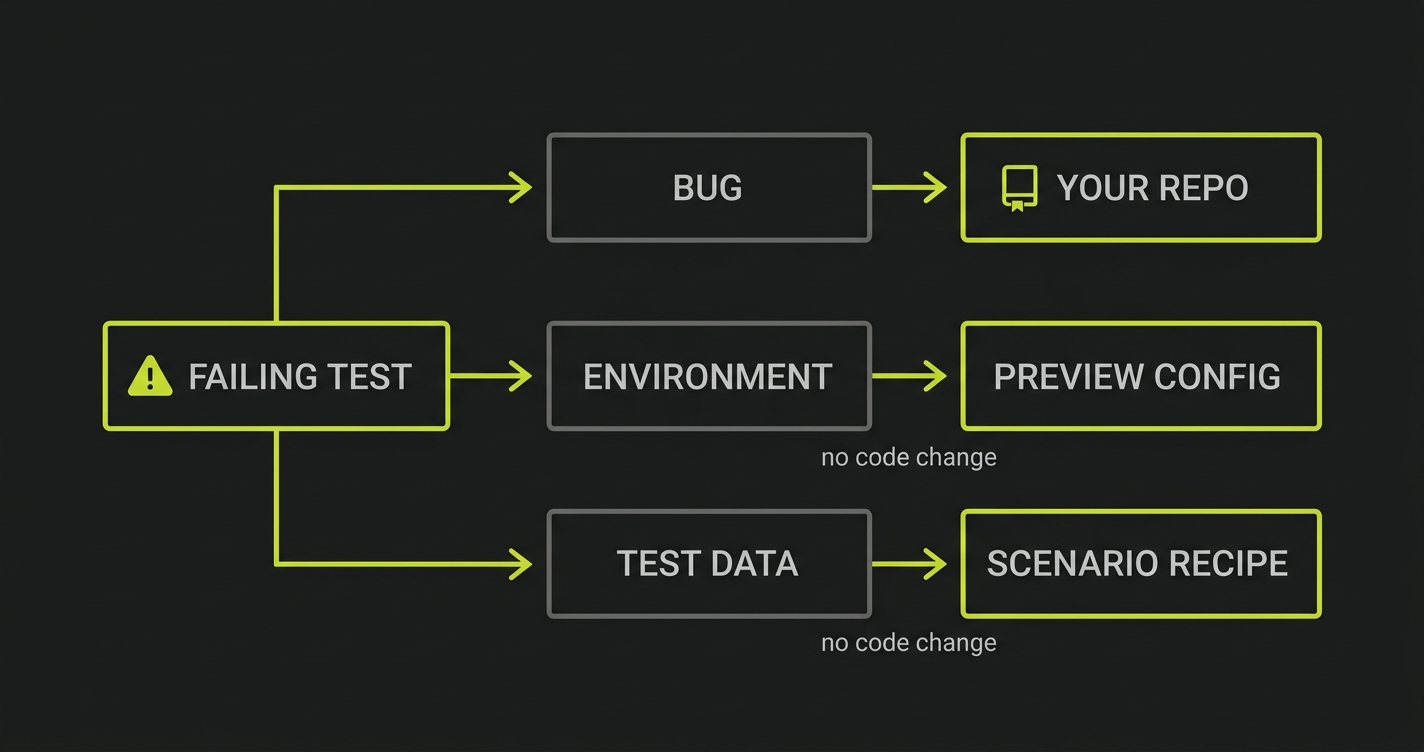
An agent that does not know this treats every failure as a code problem and goes hunting through your source for a bug that is not there. Told where to look, it fixes a missing secret in one call.
Start with the open pull requests
The prompt leads with what is blocked right now, ordered by how much each is carrying.
Merged and closed pull requests are listed too, but explicitly as reference only - do not go fix them. Nobody is waiting on a closed branch. They are there because their runs often show the same failure with more evidence attached, which helps diagnose something still live elsewhere.
One cause, many pull requests
This is where the leverage is.
When Autonoma sees the same failure on more than one branch, the prompt says so, with the numbers:
Most of this is probably ONE problem. These findings repeat across pull requests:  · 10 pull requests, 2 still open - 185 findings - "Scenario setup failed    before the app was exercised: SDK returned HTTP 500"
Diagnose the shared cause FIRST and fix it once, then re-run and see how manyclear before you move on.
That is a real example. One misbehaving endpoint accounted for 185 of that app’s 200 findings. Worked one finding at a time, an agent would have repaired the same thing ten times over. Fixed once, roughly 85% of the backlog cleared.
The prompt only says this when it is true. Repeats are matched on the exact finding, never a fuzzy guess - so when your failures are genuinely distinct, the section is simply absent rather than sending your agent hunting for a pattern that is not there.
What it will not do
The prompt tells your agent, in as many words, not to disable, skip or delete a test to make a run go green. If a test is genuinely wrong about your app, it is asked to say so and explain why rather than removing it quietly.
This matters more than it sounds. A suite that gets back to Calibrating by deleting its failures is worth less than the suite that was failing - you would have traded a signal you could act on for a green light that means nothing.
Findings that are not yours to fix
Two kinds never appear in the prompt:
- Engine artifacts - our test harness flaked or crashed. Ours to fix, and there is nothing useful for your agent to do.
- Plan mismatches - the app rendered correctly but the test does not match it. Autonoma’s own self-healing loop owns these and retries them on later runs.
They still count against your trust rate, because a run that flakes tells you nothing either way. They are just not work we would send you after.
After the fix
Suite health recomputes on your next analysis run. Clearing a backlog moves two things at once: the stale-failure penalty comes off, and the runs that follow start reaching real verdicts again.
Resolving issues also feeds the triage adjustment, which is one of the requirements for reaching Proven.